
Finding and Merging Duplicates
The same character tends to arrive in your world more than once. You write a chapter and the extraction picks up “Maren Oskar”, then a later chapter spells it “Maren Oskarr”, then you create her by hand because you forgot she was already there. Three entities, one person, and the relationships you have drawn since are now split across all three.
Duplicate detection finds those and folds them back together.
Run a scan
Section titled “Run a scan”- Go to Entities in the world sidebar.
- Open the ⋮ menu next to New Entity and choose Find Duplicates.
- Click Scan for Duplicates and wait. Every entity in the world is compared, so a large world takes a moment.
- Review the groups it found.
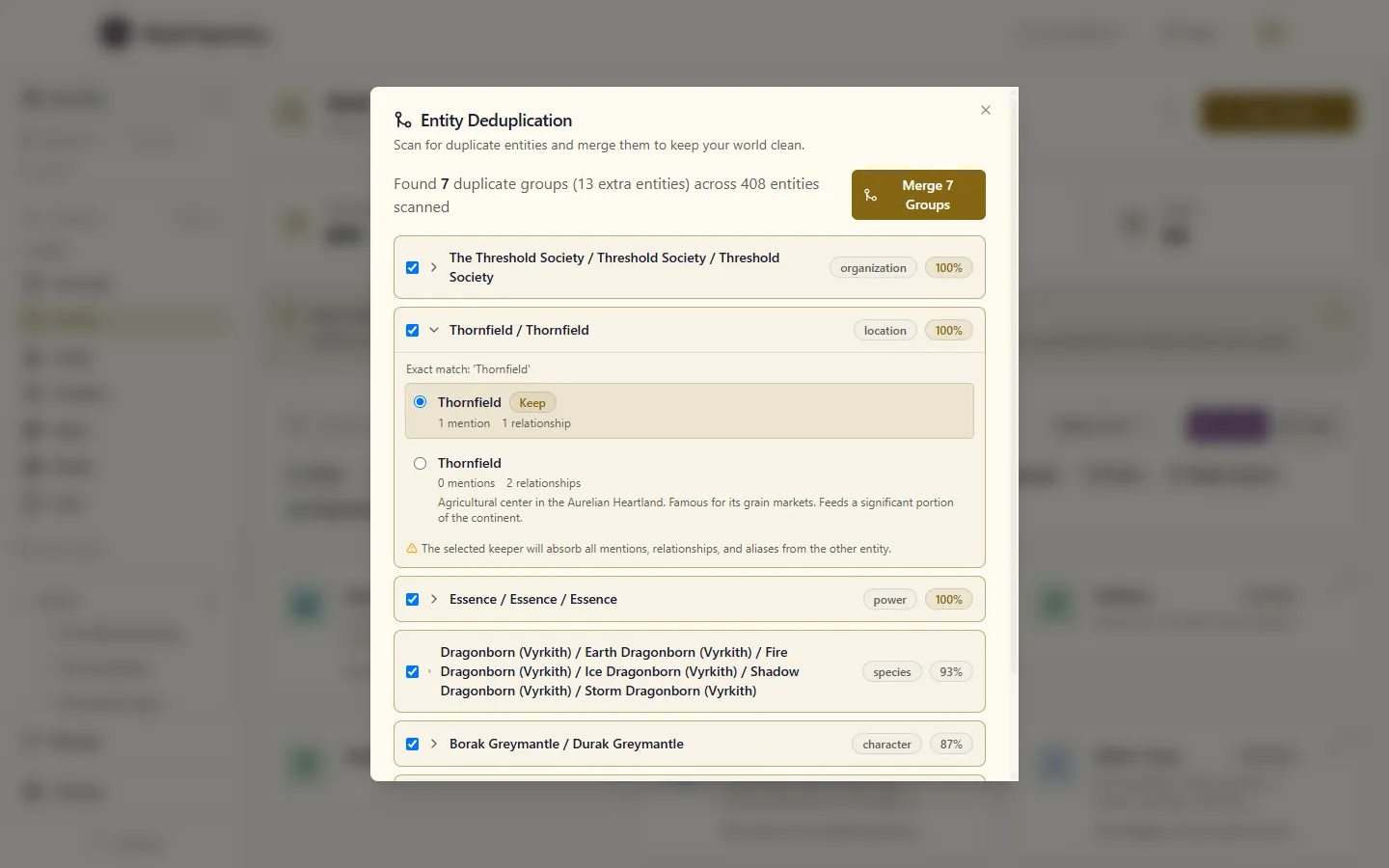
The summary line tells you how many groups it found and how many entities it scanned to find them. The second number matters: it is how you tell “there are no duplicates” apart from “the scan did not reach that far”.
How matching works
Section titled “How matching works”Entities are compared on their names and aliases, and only against others of the same type. A character is never grouped with a location, however similar the names.
Two names have to score at least 85% similar to be grouped. That threshold is fixed — there is no slider.
It matches spelling, not meaning. If you have written the same fortress as “The Iron Citadel” in one chapter and “Ironhold” in another, the scan will not group them — those names share almost nothing as text. Merge those by hand.
Choose what survives
Section titled “Choose what survives”Each group suggests a keeper: the entity the others will be folded into. The suggestion is the member the rest of your world points at most, counting both mentions in your writing and relationships. When that’s a tie, the one with a description wins, then the one with more aliases. So the “Thornfield” with a description and two relationships is kept over a stub that was mentioned once. Change it if the suggestion is wrong.
You can also deselect any group entirely. A scan finding something is not a claim that it is right — two distinct siblings with near-identical names is a normal thing for a world to contain.
Resolve the differences
Section titled “Resolve the differences”Where the members of a group disagree, you are asked to choose before anything is written. That covers:
- Plain fields — description, status, and anything else on the entity.
- Custom fields — resolved one key at a time, so choosing the duplicate’s value for one field does not drag the rest along with it.
- Relationship properties — where both entities have the same relationship to the same third entity but describe it differently.
For each one you keep the keeper’s value, take the duplicate’s, or type a replacement.
Aliases are not a conflict. Every name the group knew becomes an alias on the survivor, so the merged entity stays findable by whatever you used to call it.
What the merge does
Section titled “What the merge does”The survivor absorbs everything:
- Every mention in your writing is transferred, and the links in your prose are rewritten to point at the survivor.
- Every relationship is rewired.
- Every alias is carried over.
If a merge cannot finish, it tells you which step failed rather than reporting success. Your writing and your graph can end up briefly out of step in that case; re-running the scan shows you what is left.
When to do this
Section titled “When to do this”A scan is worth running:
- After importing a world, or a large batch of content.
- After a long writing session where extraction has been creating entities for you.
- Before doing serious work in the graph view, since duplicates are what make a graph look sparser and more scattered than the world really is.