
Creating and Editing Through Chat
Chat isn’t only for asking questions. You can also ask it to create a character, change an existing one, or connect two things together — and it will draft the change for you to look over.
Nothing is written to your world until you approve it. The assistant never creates, edits, or links anything on its own. It always comes back with a card describing what it wants to do, and your world stays exactly as it was until you accept some or all of it.
Asking for a change
Section titled “Asking for a change”Type a request the way you’d say it to a collaborator:
Create a smuggler called Kessa Vaun who works for the Pirate Confederation
The assistant replies with a short summary and a card listing what it’s proposing — here, two items: a new character, Kessa Vaun, and a relationship connecting her to the Pirate Confederation. Each item shows whether it’s a new thing or a change to an existing one, and a name so you can tell items apart at a glance. A relationship reads the way your world words it — here “Member of”, with both ends named, “the new Kessa Vaun → Pirate Confederation” — so you can check which way round it points before you approve it.
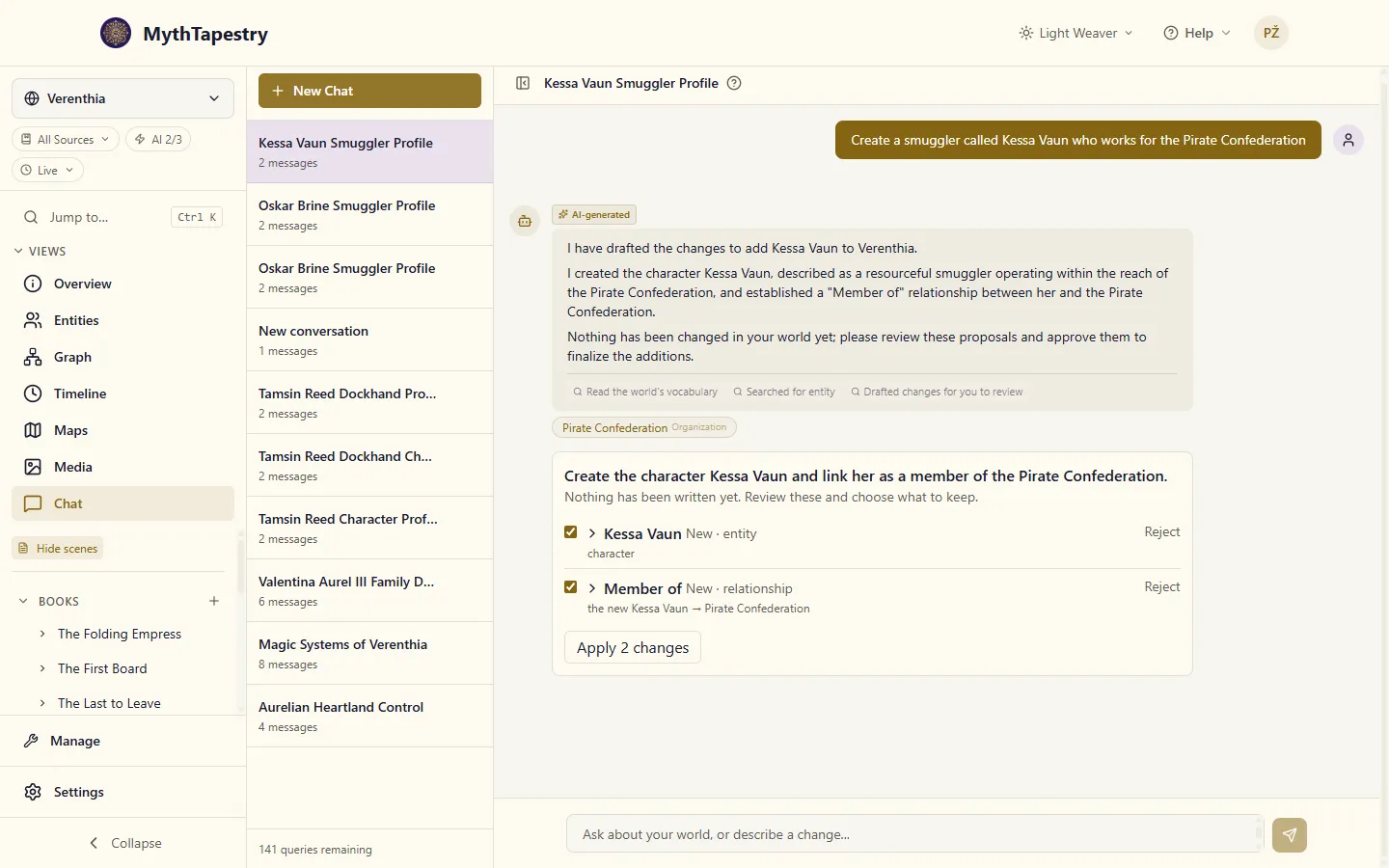
You don’t have to ask for everything in one message. “Change Kessa’s status to wanted” against an existing character works the same way — one item, proposing the update.
What it can draft
Section titled “What it can draft”Characters and connections are the common case, but the same review-then-approve flow covers most of the furniture of a world:
- Things and the links between them — a character, a place, an event; a relationship joining two of them.
- The shapes those things take — a new entity type (“airship”) with its own fields, or a new kind of relationship (“smuggles for”, running the other way as “employs smuggler”).
- Where your writing lives — a container to hold it (a book, a chapter, a session), and the kind of container it is, if you want one your world doesn’t have yet.
- The writing itself — a scene or an entry inside a container, prose and all. Ask for “a short scene where Kessa loses the cargo” and it drafts the prose into the card, where you can read and rewrite it before a word of it lands.
A single request can mix these. “Start an anthology called Tales of the Ashfall, with an opening scene about the run” can come back as three items — the container type, the anthology itself, and the scene inside it — each one reviewable on its own. Items that depend on each other are applied in order, so if you reject the container, the scene that was going to sit inside it is held back rather than written somewhere unexpected.
Reviewing before you approve
Section titled “Reviewing before you approve”Every item starts out checked. Before you apply anything, you can:
- Expand an item (click its name) to see the details the assistant filled in, and correct any of them yourself. Nothing forces you to accept its wording — if it drafted Kessa’s description slightly off, fix it right there before approving.
- Reject one item without losing the rest. If the assistant proposed both a new character and a relationship you don’t want yet, uncheck or reject just the relationship — the character still goes through.
- Apply once you’re happy. The button tells you how many items you’re about to write, so there’s no surprise about what “Apply” will actually do.
Only the items still checked when you click Apply get written. Anything you rejected stays rejected; anything you left unchecked simply isn’t included in that pass — you can come back and apply it later if you change your mind.
If the assistant drafts a connection that sits outside how long one of the things it joins was around — say, a friendship proposed to start before someone was born, or an alliance dated before the kingdom it names was founded — the card shows a note about it right there. It’s a note, not a refusal: the assistant still drafted the connection, and you decide whether to fix the dates or approve it as is.
The same kind of note appears when the assistant drafts something with a name your world already uses. Ask it to “add Pell as a character” when you already have a Pell, and the card says so — and the assistant tells you in its answer — because applying it makes a second Pell. Sometimes that’s what you want (two innkeepers can share a name); if you meant the one you have, ask it to change that one instead.
The / commands
Section titled “The / commands”Typing / in the chat box opens a small menu: /create, /edit, and /link. These aren’t a separate feature — they’re a shortcut that drops in a starting phrase (“Create “, “Edit “, “Link “) so you don’t have to remember the right verb. Everything after that is the same request-and-review flow described above.
Coming back later
Section titled “Coming back later”A proposal doesn’t expire and it isn’t tied to the moment you asked. It’s part of that chat session’s history, sitting under the message that produced it. Close the tab, come back tomorrow, switch to a different session and back — the card is still there, still showing whichever items you haven’t dealt with yet, and you can still expand, correct, reject, or apply them exactly as before.
When the world moved on without it
Section titled “When the world moved on without it”This is the one behavior worth understanding before you rely on it.
Say the assistant proposes changing Kessa Vaun’s status to “wanted,” but before you get around to approving it, you (or someone else, or another chat session) edit Kessa’s record directly and change her status yourself. When you finally click Apply on the old proposal, that item is held back rather than applied — it doesn’t overwrite your more recent edit, and it doesn’t silently vanish either. The card tells you it changed since it was drafted, so you know why nothing happened, instead of wondering whether your approval was ignored.
Any other items in the same proposal that weren’t affected still apply normally. Only the ones that actually went stale are held back.
The same goes for an item that fails outright. Say the proposal adds two relationship types, “Guards” and “Watches over,” and in the moment between drafting and applying, someone else in your world creates their own “Watches over.” Your “Guards” is written and marked applied; your “Watches over” is marked as failed, with a note on the card. Each item’s result is saved as soon as it’s known, so an item that made it into your world is always shown as applied — never left looking undone, and never written a second time.
That holds even if the connection drops halfway through. Say you approve “Guards” and the link to the server cuts out the instant after it’s written. Click Apply again and “Guards” shows as applied, pointing at the type that was made — it isn’t created a second time, and anything in the same proposal that builds on it goes through too. Until then, an item like this can’t be edited: the change already exists, so apply again first, then edit what was created.
It only proposes what your world actually supports
Section titled “It only proposes what your world actually supports”The assistant drafts using the entity types, relationship wording, and fields you’ve already defined for this world — including custom ones you invented yourself. It won’t quietly invent a field your world doesn’t have. If you ask it to record something your world has no place for yet, it will either say so or propose the missing type alongside the thing that needs it — so you approve the shape and the thing that uses it together, and can reject either half.
That includes which things a kind of connection can join. If your world’s Related to is only for species and creatures, the assistant can’t use it to link two characters: it’s caught while the assistant drafts, so it picks a connection that fits — Knows, say — instead of you finding out at Apply that a link “could not be applied”.
Linking to things by name
Section titled “Linking to things by name”Ask for “Oskar Brine, a member of the Pirate Confederation” and the assistant links him to the Pirate Confederation you already have. A name, or an alias, that belongs to one thing in your world is all it needs, and a thing created in the same request is linked to the new one, even if your world already has something with that name.
When a name could mean more than one thing — two places both called Saltmarsh, say — it won’t pick one for you. It asks which you mean, or uses the one your request makes clear. A name that’s only close to something, like “Pirate Confederacy”, is never treated as a match either: the assistant checks rather than linking Oskar to something you didn’t name.
If none of its drafts go through, it tells you so plainly, and nothing in your world has changed.
If it runs out of room
Section titled “If it runs out of room”The assistant gets a fixed number of turns to look things up before it has to answer, and a request that sends it on a long hunt through your world can use them all before it gets to the drafting itself. When that happens it says so plainly: that it ran out of turns before it finished drafting, and that nothing in your world has changed.
Nothing is left half-written. A change is only ever written when you approve it on a card, so an attempt that never got as far as drafting leaves no trace at all.
What it won’t change
Section titled “What it won’t change”A few things are deliberately out of its reach, and it will tell you rather than half-doing them:
- Calendars. Dates in this app are world-calendar days, not real-world ones, and the rules holding that together are strict enough that calendar changes stay in the calendar editor for now.
- An entity type that’s already in use. It can create a new one, but changing a field on a type your entities already use has to decide what happens to every existing entity that has it — so that stays a deliberate edit in your world’s settings.
- Built-in types. The types that ship with every world can’t be edited or re-created. Make one of your own instead; yours sits alongside them.
- Renaming a type. A type’s name is how everything already using it finds it, so a proposal can change a type’s labels, description and fields, but not the name itself.