
Entity Detection & Mentions
As you write in the content editor, MythTapestry can detect references to entities in your text and suggest linking them to your knowledge graph. This feature is entirely optional — you can always link entities manually using the @ mention system instead.
How it works
Section titled “How it works”- You write content that mentions an entity (e.g. “Aldric rode to the Crimson Tower”)
- The system detects “Aldric” and “Crimson Tower” as potential entity references
- Suggestions appear as highlighted text with a subtle indicator
- You can confirm or dismiss each suggestion
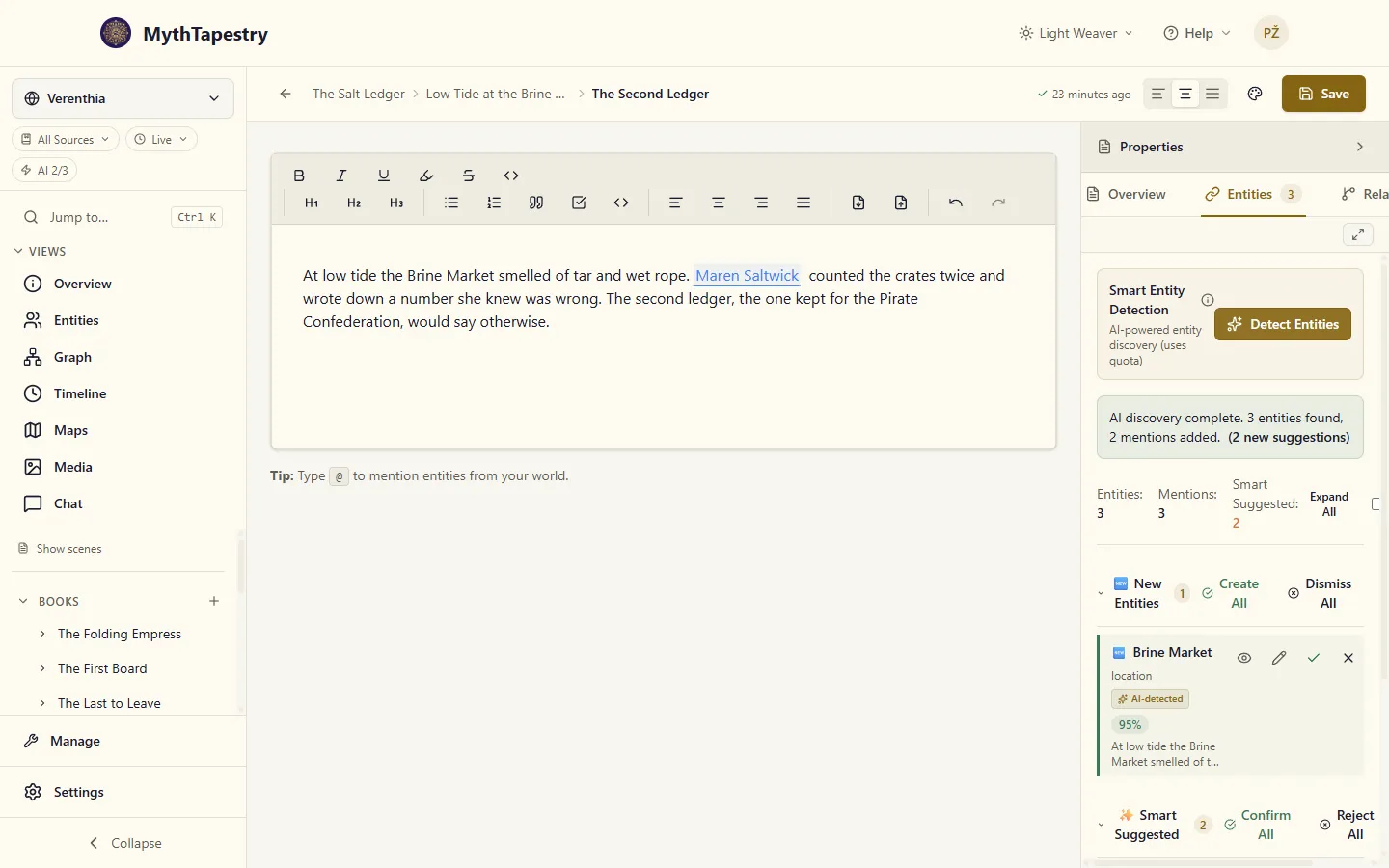
In the scene editor, detection lives on the Entities tab of the right-hand panel. Click Detect Entities to run it.
Detection methods
Section titled “Detection methods”There are two ways to run detection — you choose per world in World Settings.
Local (no AI, no quota)
Section titled “Local (no AI, no quota)”The local detector runs entirely on the MythTapestry server. Nothing about your writing leaves the server, no AI provider is involved, and it doesn’t draw from any quota.
- Fast — usually under a second per scene
- Private — text stays on the server; no third-party AI sees it
- Free — doesn’t use any allowance
- Good for straightforward references: proper names, places, organisations you’ve already added to your world
- Less good at unusual phrasings, common-word names (“The Crown” as a faction), or anything that needs to read context
The AI detector sends the text to a language model (the one you’ve picked in model preferences) along with the list of entities in your world. It’s better for context-dependent references and ambiguous phrasings.
- More accurate for unusual or ambiguous references
- Better at spotting that “The Crown” refers to a faction, not a literal crown
- Uses your Entity Detection quota
A run does more than name things. It also checks whether a suggestion is somebody you already have under a slightly different spelling — so a second Kaelen Thorne doesn’t quietly appear beside the first — and, where a mention was matched to the wrong entity, proposes the one it thinks you meant. Those checks are part of the same run and don’t cost anything extra: one detection, one operation, however much thinking happens inside it.
Detection modes
Section titled “Detection modes”| Mode | Trigger | Description |
|---|---|---|
| Manual | Click the “Detect Entities” button | You control when detection runs |
| Auto | On content save | Detection runs automatically when you save |
| Selection | Ctrl+Shift+E or right-click → Extract Entities | Runs on the selected text only |
The manual and auto modes are configured per world in World Settings. You can disable detection entirely if you prefer to manage mentions manually.
Selection-based extraction
Section titled “Selection-based extraction”Instead of scanning your whole document, you can extract entities from a specific passage:
- Select the text you want to analyse in the editor
- Press Ctrl+Shift+E, or right-click → Extract Entities
- Only the selected text is sent through the detection pipeline
- Results appear in the Entities tab as suggestions, ready to confirm or dismiss
This uses exactly the same GLiNER or AI pipeline as full-document detection — just scoped to your selection. It’s particularly useful for dense passages (introductions, infodumps, battle scenes) where you want to catch every reference without re-scanning work you’ve already reviewed.
Managing mentions
Section titled “Managing mentions”Single mention
Section titled “Single mention”When one entity is detected in a text selection, you see an inline confirm/dismiss action right at the mention location.
Multiple mentions
Section titled “Multiple mentions”When several entities are detected, the Entities tab sorts them into two groups, and each group’s buttons act on that group only:
- Smart Suggested — mentions of entities you already have. Confirm All links every one of them; Reject All removes them. The badge counts the entities in this group.
- New Entities — things that look like entities your world doesn’t have yet. Create All creates each one and links its mentions; Dismiss All removes them without creating anything.
Confirm All, Reject All and Dismiss All ask first, and say how many suggestions they will touch. Rejecting or dismissing can’t be undone. You can still confirm or dismiss each mention on its own.
Where a confirmed link goes
Section titled “Where a confirmed link goes”Each suggestion remembers the exact words it was found in, and confirming it links those words, not the first match on the page. Say “Alaric” is suggested in your second paragraph while the first already reads @Alaric Dragonheart: confirming links the second paragraph’s “Alaric” and leaves the existing link whole. Detection also skips any words already inside a link.
Pronouns are never offered as links. Detection reads “she” and “him” to work out who is who, so She waved him through still counts towards Merrow Vane, but it won’t suggest turning “She” into a link.
Creating a suggested entity checks your world first. If the AI offers “Osric Vane” as new and you already have an Osric Vane, the mention links to yours rather than making a second one. This applies to the quick create button; Review & edit creates exactly what you fill in.
Mention states
Section titled “Mention states”| State | What it looks like | What it does |
|---|---|---|
| Confirmed | Solid highlight, clickable link to the entity | Stays across saves; shows up in the graph and on the entity’s Mentions tab |
| Suggested | Subtle highlight with confirm/dismiss actions | Stays across saves but does not appear in the graph or count toward features that need confirmed mentions |
| Dismissed | Removed from the text | Won’t be suggested again at this spot |
Suggesting new entities
Section titled “Suggesting new entities”If you enable Suggest new entities in World Settings, detection can also flag text that looks like it refers to an entity that doesn’t exist in your world yet. These appear with a different indicator so you can decide whether to create the entity then and there. This pairs well with Entity Assist’s Fill with AI, which can pre-fill the new entity’s fields from the same scene in one step.
Detection sensitivity
Section titled “Detection sensitivity”The confidence threshold (default 0.7) controls how sure the detector has to be before it flags something. Lower it to catch more (at the cost of more false positives), raise it to be stricter (at the cost of missing some). Most worlds work fine on the default; only adjust if you’re seeing too many or too few suggestions in practice.